
How to compress a PDF under 200 KB without losing the text
· 6 min read
A step-by-step way to get a PDF under a size limit in your browser, what the result looks like on real files, and what to do when it will not go lower.
Why the limit is on the file, not the pages
Application portals, job boards and mail gateways cap uploads at a size: 200 KB and 100 KB are the usual numbers in India, 2 MB and 5 MB elsewhere. The cap is on the file, so what matters is not how many pages you have but what is on them. A page of typed text takes a few kilobytes; a scanned page at 300 dpi takes a few hundred. Getting under a limit is therefore mostly about the pictures, and the tool below works on exactly those while leaving the text as text.
Step by step
- Open Compress PDF and add the file. It stays in your browser; nothing is uploaded, which also means there is no queue and no limit on how many times you try.
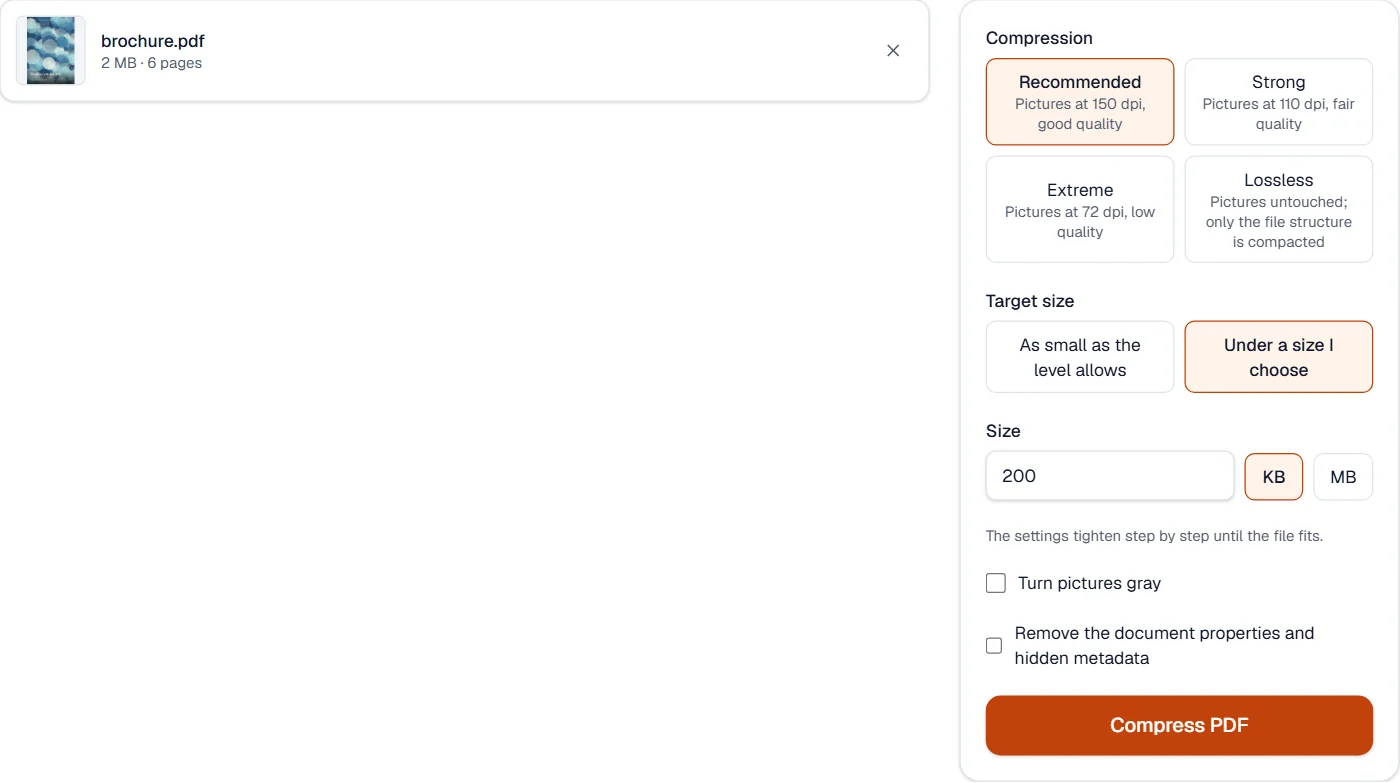
- Under Target size choose Under a size I choose, type 200 and leave the unit on KB. The tool tightens its settings step by step, quality first and resolution second, until the file fits.
- Press Compress PDF. The result says the size before and after. If the target could not be reached, a notice says so and you still get the smallest file the steps could make.
- Download it and open it once. Zoom into a stamp or a signature to see that it is still readable; the text itself is never turned into a picture, so it stays sharp and can still be selected and searched.
What to expect, measured on our own files
| File | Original | Result | Time |
|---|---|---|---|
| Text report, 3 pages | 9.6 kB | 9.6 kB | 0.1 s |
| Scanned invoice, 2 pages | 410 kB | 124 kB | 1.5 s |
| Scanned letter, 1 page | 155 kB | 99 kB | 0.9 s |
| Photo brochure, 6 pages | 2 MB | 181 kB | 3.0 s |
Scans and photos reach the target, the six-page brochure with little room to spare, because their pictures can be re-encoded smaller. The text report is already far below 200 KB and simply stays where it is: there is nothing in it to shrink, which is the case for most documents that came out of Word or Google Docs.
When the target is not reached
The notice means the pictures were made as small as the last step allows and the rest of the file is still larger than the limit. In order of how often it helps:
- Send fewer pages. A portal that wants one certificate does not want the cover letter stapled to it. Remove pages or Split PDF first, then compress what is left.
- Tick Turn pictures gray. A colour scan of a black-and-white page carries three channels of paper tint for nothing. The checkbox under the target removes them.
- Scan again at 150 dpi. A page scanned at 300 dpi has four times the pixels of one at 150, and a form or a letter is perfectly readable at 150. If you scan with a phone, Scan to PDF makes a clean, flat page that compresses far better than a photo.
- For a one-page scan, go through JPG. PDF to JPG can save the page under a size you choose, and JPG to PDF wraps it back into a PDF. You lose the text layer, which a scan did not have anyway.
- A text-only PDF that is still large is a font problem. Some exporters embed whole fonts, several megabytes each. Export it again from the original document with the smallest-size option, or print it to PDF; the guide on why a PDF will not compress explains how to tell.
100 KB and below
Divide the limit by the number of pages before you start. 100 KB over five scanned pages is 20 KB a page, which at 72 dpi in grayscale is still readable for typed text but not for a photograph or a faint stamp. If the arithmetic does not work, the answer is fewer pages or a better scan, not a stronger setting: the tool already goes as far as a readable page allows, and will say so rather than hand you an unreadable one.
- 200 KB
- Comfortable for one to three scanned pages at 150 dpi, or a dozen typed pages.
- 100 KB
- One or two scanned pages in grayscale, or any typed document.
- 50 KB
- A single scanned page at 72 dpi, or typed text. Photos will not fit.
Before you send it
- Keep the original. The compressed copy is for the upload; the original is for everything else.
- Open the result in the PDF viewer and read the smallest print on the page.
- If the portal also asks for a name pattern or a page size, change the name on your device; the content is what the tool handles.