
PDF to JPG
Save each page as a JPG, PNG or TIFF picture, or pull out the pictures inside the PDF.
or drop files here
You can also paste with Ctrl+V
A document we wrote for this: nothing of yours is used.
Processed on your device. Files are never uploaded.
Quick facts
- Takes
- One PDF. A password-protected PDF is opened once its password is typed on the file card.
- Gives
- Each chosen page as a JPG or PNG at 72, 150 or 300 dpi, or as a TIFF for archives and fax, in a ZIP; or the pictures stored inside the PDF, pulled out as they are, JPEGs exactly as stored and everything else as PNG.
- Runs
- In your browser. The file is never uploaded, and nothing is kept anywhere.
- Plan
- Free, with no account and no watermark: 10 tasks a day, on files up to 50 MB and 100 pages. Pro has no daily count and takes files up to 500 MB, with no page limit.
- Four ways
- JPG, PNG and TIFF draw what a reader shows, page by page; the pictures inside takes the photos and scans the file holds, at their own resolution, without the text around them. Each is chosen above the files.
Drawn by the reader, or taken from the file
A page is drawn by pdf.js, the renderer Firefox uses, at the resolution you choose, capped at 30 megapixels so a phone does not run out of memory, and saved as JPG or PNG. The pictures inside the file are a different thing: a JPEG stored in the PDF comes out byte for byte as it went in, and a picture stored in any other way is decoded from its samples and written as PNG by the engine itself; the few kinds it does not decode, JPEG 2000, JBIG2, fax and CMYK JPEGs, are left out with a notice.
For the words rather than the look, PDF to Markdown reads the text; a scan needs OCR PDF first.
Measured on our sample file
| Sample | Pages | Input | JPGs together | Smallest page | Largest page | Time |
|---|---|---|---|---|---|---|
| Picture brochure | 6 | 2 MB | 2.3 MB | 356 kB | 422 kB | 1.1 s |
Read it as what to expect: a full-page picture at 150 dpi is a few hundred kilobytes of JPG, a text page is far less, and six pages take about a second on a laptop.
What it looks like
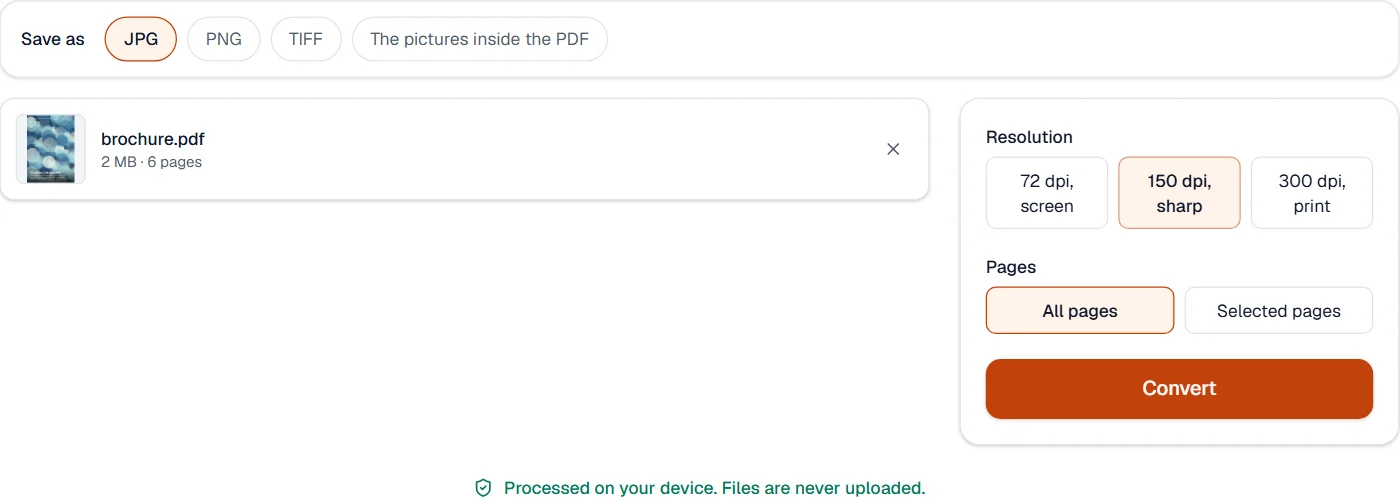
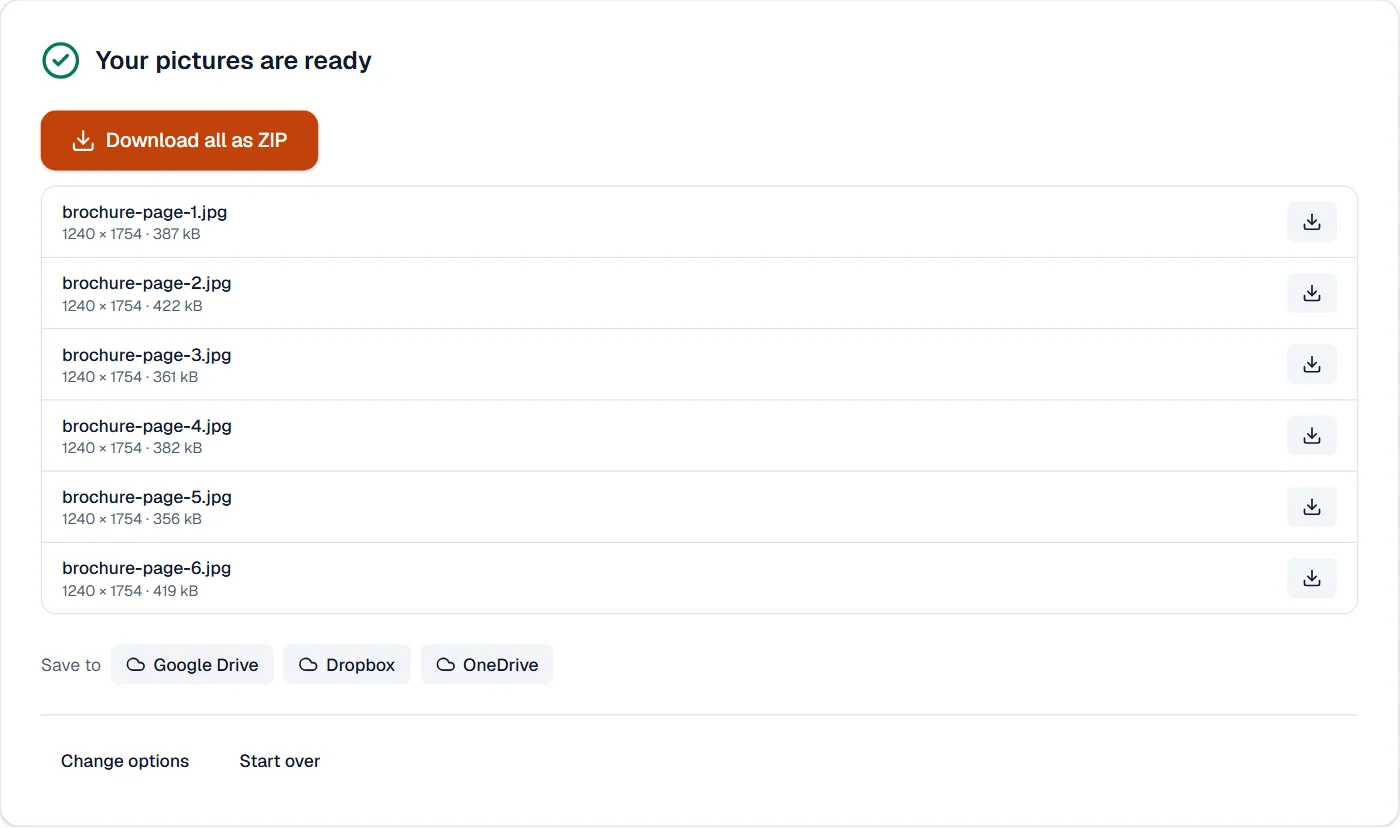
PNG
Choose PNG above the files for pages drawn without any loss, every pixel kept, as a diagram or a form wants.
Quick facts
- Takes
- One PDF, or several with Pro.
- Gives
- A PNG of each page, or of the pages you choose, at 72, 150 or 300 dpi, in a ZIP.
- Runs
- In your browser. The file is never uploaded.
- Plan
- Free, with no account and no watermark: 10 tasks a day, on files up to 50 MB and 100 pages. Pro has no daily count and takes files up to 500 MB, with no page limit.
Pages drawn, every pixel kept
Each page is drawn by pdf.js, the reader in Firefox, at the resolution chosen, on white paper, and saved as a PNG, which keeps every pixel: text and lines stay crisp. A page over 30 million pixels is drawn smaller. For smaller files of photos, use PDF to JPG.
Measured on our sample file
| Sample | Pages | Images | Time |
|---|---|---|---|
| Quarterly report | 3 | 722 kB | 1.1 s |
TIFF
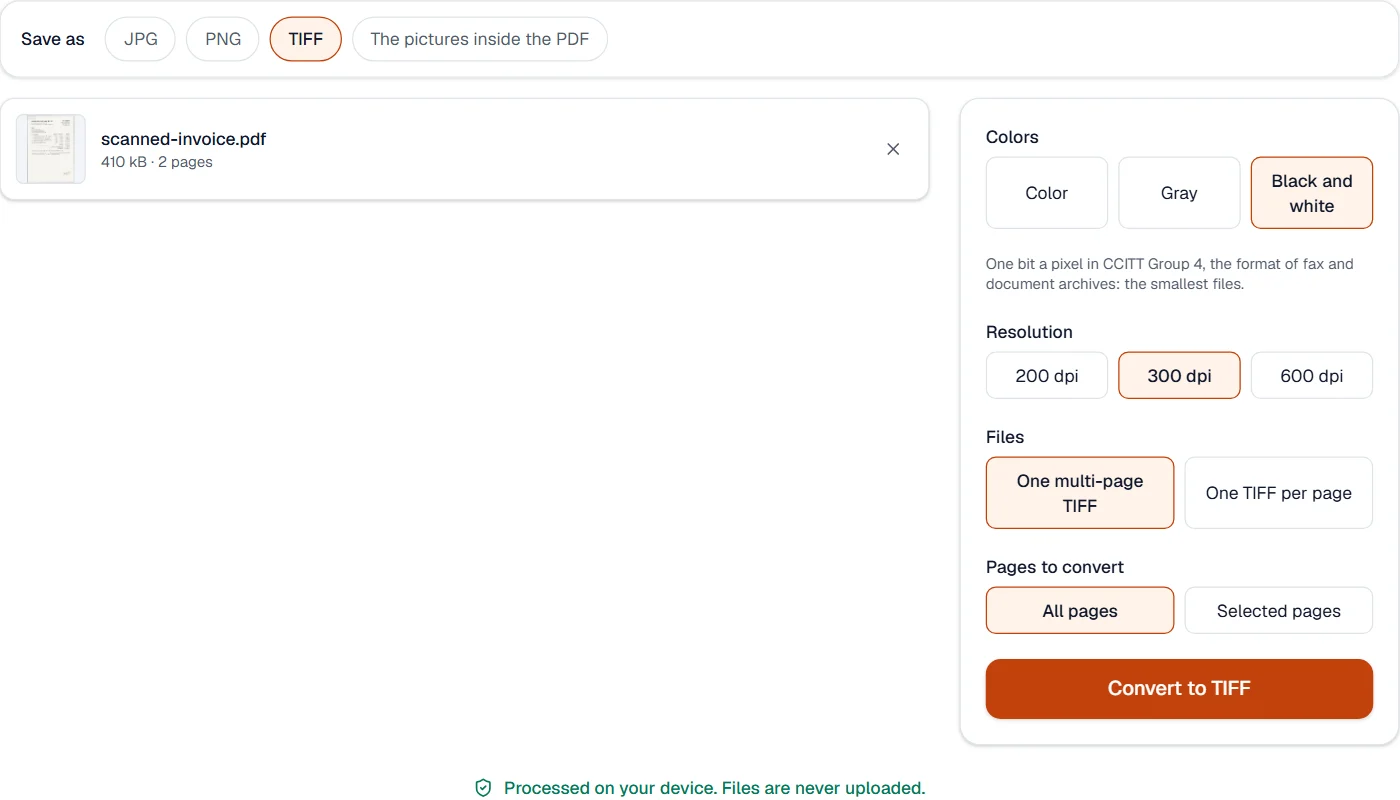
Choose TIFF for archives, fax and print shops: one multi-page file or one file a page, in color, gray or black and white.
Quick facts
- Takes
- One PDF. A password-protected PDF is opened once its password is typed on the file card.
- Gives
- The pages as TIFF pictures: one multi-page file, or one file per page in a ZIP. Color or gray at 150, 200 or 300 dpi; black and white at 200, 300 or 600 dpi.
- Runs
- In your browser. The file is never uploaded, and nothing is kept anywhere.
- Plan
- Free, with no account and no watermark: 10 tasks a day, on files up to 50 MB and 100 pages. Pro has no daily count and takes files up to 500 MB, with no page limit.
- Compression
- Lossless only: LZW with the horizontal predictor for color and gray, CCITT Group 4 for black and white, the format fax machines and document archives expect.
A TIFF written in your browser
Each page is drawn by your browser at the resolution you choose, up to 30 million pixels a page, and encoded here: no plugin, no server. Color and gray pages are compressed with LZW after the horizontal predictor, which turns smooth areas into runs of small numbers and shrinks a scan without losing a bit. Black and white pages are thresholded and written in CCITT Group 4, one bit a pixel, which is what fax software, case management systems and archives read.
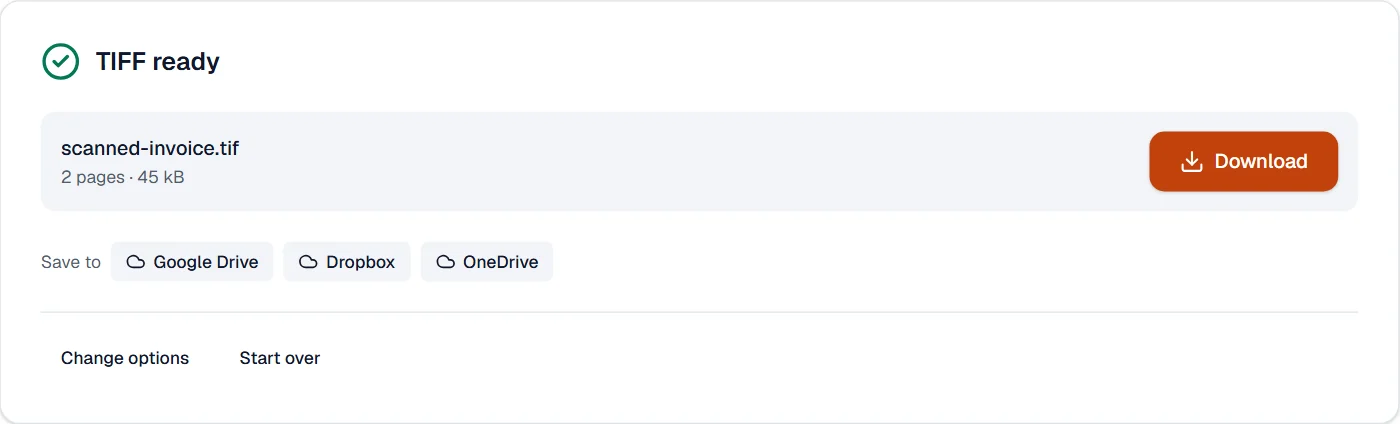
A multi-page TIFF holds every page in one file, each with its resolution recorded, so it prints at its true size. The writer was checked against the TIFF reader built into Windows, which decoded every page pixel for pixel.
Measured on our sample file
| Kind | Resolution | Output | Time |
|---|---|---|---|
| Black and white, Group 4 | 300 dpi | 43 kB | 1.2 s |
| Gray, LZW | 200 dpi | 1 MB | 0.5 s |
| Color, LZW | 150 dpi | 1.2 MB | 1.0 s |
What it looks like
The pictures inside the PDF
Choose The pictures inside the PDF to take out the photos and scans the file holds, as they are stored, at their full size.
Quick facts
- Takes
- One PDF, or several with Pro.
- Gives
- Every picture stored in the file, JPGs as JPGs and the rest as PNGs, in a ZIP.
- Runs
- In your browser. The file is never uploaded.
- Plan
- Free, with no account and no watermark: 10 tasks a day, on files up to 50 MB and 100 pages. Pro has no daily count and takes files up to 500 MB, with no page limit.
Pictures as they are stored
The pictures are read out of the file without drawing the pages: a JPEG is saved with its very bytes, and other pictures are written as PNGs at their stored size, which can be larger than they look on the page. What is drawn with lines, such as most charts, is not a picture; to get whole pages, use PDF to PNG.
Measured on our sample file
| Sample | Pictures | Total | Time |
|---|---|---|---|
| Brochure | 6 | 2 MB | 0.1 s |
What it cannot do
- Save a page as a vector drawing (SVG). The pages come out as pixels, at the resolution chosen.
- Go above 30 megapixels for one page. A very large page at 300 dpi is capped there.
- Pull out pictures stored as JPEG 2000, JBIG2 or fax (CCITT), or CMYK JPEGs. They are left out with a notice; the page can still be saved as a picture.
- Keep a transparent background in JPG. PNG keeps it; JPG has none.
- Make PNGs smaller than JPGs. PNG keeps every pixel; PDF to JPG gives smaller files for photos.
- Draw a page larger than 30 million pixels. A very large page is drawn smaller, to keep the browser responsive.
- Extract what is drawn rather than stored as a picture, such as charts made of lines. PDF to PNG draws whole pages.
- Join a picture stored in strips. Each strip is saved as it is stored.
- Make TIFFs larger than 30 million pixels a page: the resolution is lowered to fit.
- Keep text as text: a TIFF is a picture.
- Compress with JPEG inside the TIFF: only lossless compression is used.
If something goes wrong
- No pictures were found inside
- The page is drawn with lines and text, not placed as a picture. Save each page as a picture instead.
- The pictures are blurry
- 72 dpi is for screens. Choose 150 dpi to read on screen at any size, or 300 dpi for print.
- This PDF is protected. Enter its password to continue.
- Open it in Unlock PDF with its password first. Open Unlock PDF
- This PDF is protected. Enter its password to continue.
- Type the password on the file card; it never leaves your device.
- The images are large files
- Choose 150 or 72 dpi, or PDF to JPG for photos. Open PDF to JPG
- This PDF holds no pictures that can be pulled out.
- The PDF holds no pictures; PDF to PNG draws its pages instead. Open PDF to JPG
- This PDF is protected. Enter its password to continue.
- Type the password on the file card; it never leaves your device.
- The file is very large
- Choose gray or black and white, or a lower resolution.
- Black and white loses pale text
- Choose gray, which keeps every shade.
- This PDF is protected. Enter its password to continue.
- Open it in Unlock PDF with its password first. Open Unlock PDF
About PDF to JPG
PDF to JPG saves every page, or the pages you choose, as JPG or PNG pictures at the resolution you pick. Useful for slides, previews, social posts and anywhere a PDF cannot be embedded.
How to use PDF to JPG
Add the PDF.
Choose JPG or PNG, the resolution and the pages.
Choose Convert and download the pictures, one or all of them in a ZIP.
Frequently asked questions
- Which resolution should I choose?
- 150 dpi suits screens and previews; 300 dpi suits printing and reading small text. Higher values make larger files.
- Can I extract the original pictures instead of rendering pages?
- Yes. The images inside a PDF can be pulled out at their original quality from the same page.
- JPG or PNG?
- JPG is smaller and fine for photos and most pages; PNG keeps sharp text and supports transparency.
- How do I get a JPG under 100 KB or 200 KB from a PDF?
- Choose JPG at 72 or 150 dpi; then run Compress image on the pictures with the size you need.
- Can I convert just one page?
- Yes. Choose "Selected pages" and type the page number, or a range such as 2-4.
- PNG or JPG?
- PNG keeps text and lines crisp and never blurs them; JPG files are smaller for photos. PDF to JPG makes JPGs.
- Are the pictures made smaller?
- No. Each is saved at the size it is stored in the file, which can be larger than it looks on the page.
- Why is a picture split into pieces?
- Some programs store one picture as several strips or tiles; each is saved as it is stored.
- Is anything lost?
- No compression loss: color and gray use LZW and black and white uses Group 4, both lossless.
- Will programs open a multi-page TIFF?
- Yes. Windows Photos, macOS Preview, document management systems and fax software read them.
Related tools
Guides
- How to compress a PDF under 200 KB without losing the textA step-by-step way to get a PDF under a size limit in your browser, what the result looks like on real files, and what to do when it will not go lower.
- Why a PDF will not compress, and what makes PDFs largePictures, fonts, drawings, attachments and leftovers: what takes the space in a PDF, a one-minute test to tell which one is yours, and what to do about each.